- Home Page /
- Computers & Accessories /
- Laptops /
- Traditional Laptops /
- ASUS Vivobook Go 14 Slim Lightweight Laptop 14" FHD Dis...
0 ratings

Item #:
222103808
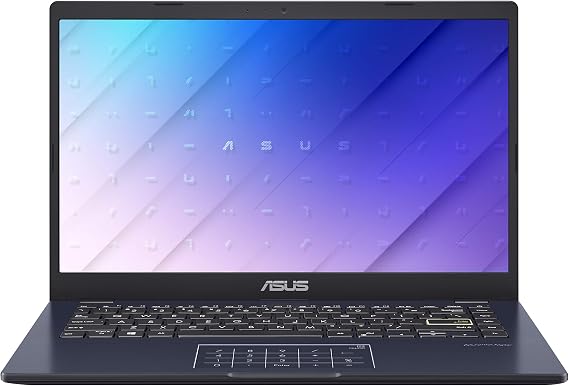
ASUS Vivobook Go 14 Slim Lightweight Laptop 14" FHD Display Intel Celeron N4500 Processor 4GB RAM 64GB Memory Windows 11 Home in S Mode
Item #:
222103808
PKR 246740
Price Details
Excluding Shipping & Custom charges ( Shipping and custom charges will be calculated on checkout )
*All items will import from UK
0 ratings
Write a review
In stock
 Imported from UK store
QTY:
Order now and get it around Thursday, July 30
Secured transaction
Ubuy works hard to protect your security and privacy. Our advanced payment security system ensures confidentiality by encrypting your information during transmission using AES (Advanced Encryption Standards) and SSL (Secure Socket Layer) protocols. Your payment details are 100% secure as we do not share your payment details with third party sellers.
Our Top Logistics Partners


Extremely Portable: This ultra thin laptop is only 2.87Ibs and 0.71 inches thin, meaning it will easily slip into a backpack to be taken anywhere you need to go.

Fast
Shipping

Free
Return*

Secure Packaging

100% Original Products

PCI DSS Compliance

ISO 27001 Certified


What Stands Out
Lightweight Design
The ASUS Vivobook Go 14 is designed for portability, weighing just under 3 pounds, making it perfect for students and professionals who need a reliable laptop on the go.
FHD Display
With a 14-inch FHD display, enjoy vibrant visuals and sharp text, enhancing your viewing experience for both work tasks and entertainment.
Efficient Performance
Powered by an Intel Celeron N4500 processor and 4GB RAM, this laptop ensures smooth multitasking and responsive performance for everyday computing needs.
Product Details
| Item Weight | 3.2 lbs (1.45 kg) |
Product Description
ASUS Vivobook Go 14 Slim Lightweight Laptop 14" FHD Display Intel Celeron N4500 Processor 4GB RAM 64GB Memory Windows 11 Home in S Mode
Have any Query? Chat with us
Customer Questions & Answers
-
Question:
What is the ASUS Vivobook Go 14?
Answer: The ASUS Vivobook Go 14 is a thin and light laptop featuring a 14-inch FHD display, powered by an Intel Celeron N4500 processor. It is designed for everyday tasks with its efficient performance and portability.Category: overviewConfidence: high -
Question:
What are the specifications of the ASUS Vivobook Go 14?
Answer: It comes with an Intel Celeron N4500 processor, 4GB RAM, and 64GB of storage. The laptop runs on Windows 11 Home in S Mode, providing a secure and efficient computing experience.Category: specsConfidence: high -
Question:
What is included in the box with the ASUS Vivobook Go 14?
Answer: The box typically includes the ASUS Vivobook Go 14 laptop, a power adapter, and a quick start guide. Additional accessories may vary by retailer.Category: accessoriesConfidence: medium -
Question:
How do I set up the ASUS Vivobook Go 14?
Answer: To set up your ASUS Vivobook Go 14, simply connect the power adapter, press the power button, and follow the on-screen instructions for initial setup. Make sure to connect to Wi-Fi for software updates.Category: setupConfidence: high -
Question:
Is the ASUS Vivobook Go 14 compatible with software applications?
Answer: Yes, the ASUS Vivobook Go 14 can run most software applications compatible with Windows 11. However, performance may vary based on the application's requirements due to its hardware specifications.Category: compatibilityConfidence: medium -
Question:
How can I maintain my ASUS Vivobook Go 14?
Answer: To maintain your ASUS Vivobook Go 14, keep it clean by regularly dusting it off and avoiding spills. Regularly check for software updates to ensure optimal performance.Category: maintenanceConfidence: medium -
Question:
What cleaning methods are recommended for the ASUS Vivobook Go 14?
Answer: Use a microfiber cloth to gently clean the screen and body of the ASUS Vivobook Go 14. Avoid harsh chemicals and ensure that the laptop is powered off while cleaning.Category: cleaningConfidence: high -
Question:
What safety precautions should I take with the ASUS Vivobook Go 14?
Answer: Ensure proper ventilation during use, avoid exposing the laptop to extreme temperatures, and keep liquids away from the device. Always follow guidelines in the user manual for safe usage.Category: safetyConfidence: high -
Question:
How do I troubleshoot common issues with the ASUS Vivobook Go 14?
Answer: For issues such as not powering on, check the power connection and battery status. If the laptop is slow, try closing unnecessary applications or restarting the device. Refer to the user manual for more troubleshooting tips.Category: troubleshootingConfidence: medium -
Question:
What is the warranty period for the ASUS Vivobook Go 14?
Answer: The ASUS Vivobook Go 14 typically comes with a standard one-year warranty, covering manufacturing defects. Check with your retailer for specific warranty terms.Category: warrantyConfidence: medium -
Question:
Can I return my ASUS Vivobook Go 14?
Answer: Returns for the ASUS Vivobook Go 14 depend on the retailer's return policy. Generally, you may return the laptop within a specified period if it is undamaged and in its original packaging.Category: returnsConfidence: medium -
Question:
What is the power consumption of the ASUS Vivobook Go 14?
Answer: The power consumption of the ASUS Vivobook Go 14 is relatively low due to the energy-efficient Intel Celeron N4500 processor, making it suitable for everyday tasks without heavy power drain.Category: powerConfidence: medium -
Question:
Is there any software specific to the ASUS Vivobook Go 14?
Answer: The ASUS Vivobook Go 14 runs Windows 11 Home in S Mode, which may include pre-installed applications for productivity. There are no specific ASUS applications that limit usage beyond standard software.Category: softwareConfidence: medium -
Question:
Where can I buy the ASUS Vivobook Go 14?
Answer: The ASUS Vivobook Go 14 is available through various retailers in the US, including online marketplaces and electronics stores. Check local availability for specific retailers.Category: availabilityConfidence: high
ASUS Traditional Laptops Editorial Review
No editorial reviews found
Customer Reviews & Ratings
1 customers ratings
-
5 Star
100%
-
4 Star
0%
-
3 Star
0%
-
2 Star
0%
-
1 Star
0%
Review this product
Share your thoughts with other customers
Platform Trust & Buyer Confidence

MT
Mohd
Verified buyer
“The product received very good packaging & safe…Thank You”
16 June 2026 · via Trustpilot
SJ
Shawati
Verified buyer
“Accurate delivery timing given”
16 June 2026 · via Trustpilot
YB
Youcef
Verified buyer
“Not madly expensive like I thought, and much quicker than promised.”
15 June 2026 · via Trustpilot
LM
Leila
Verified buyer
“Never dealt with Ubuy before, but everything worked out great. Seamless cross border purchasing and shipping. Thanks!”
6/7/2026 · via Trustpilot
KA
Kwame
Verified buyer
“The process was smooth, with clear communication and timelines. This was my 1st purchase and I am really impressed. I will definitely be coming back.”
12 June 2026 · via Trustpilot
Secure Checkout
Global Delivery
Easy Returns
Genuine Products
Product Price History
Important information
- Limitations : For products shipped internationally, please note that any manufacturer warranty may not be valid; manufacturer service options may not be available; product manuals, instructions, and safety warnings may not be in destination country languages; the products (and accompanying materials) may not be designed in accordance with destination country standards, specifications, and labeling requirements; and the products may not conform to destination country voltage and other electrical standards (requiring use of an adapter or converter if appropriate). The recipient is responsible for assuring that the product can be lawfully imported to the destination country. When ordering from Ubuy or its affiliates, the recipient is the importer of record and must comply with all laws and regulations of the destination country.
- Not all the products listed on Ubuy are for sale, as Ubuy is a global search engine. Products are subject to export/trade regulations.
PKR 246740
Order now and get it around Thursday, July 30
This item is not restrict in my country.(Please click on above link if this item is not restrict in your country, So our team will review and allow.)
QTY:
Secured transaction
PCI DSS compliant and ISO 27001:2022 certified, with encrypted payments and full buyer protection on every order.
Our Top Logistics Partners
Fastest cross-border delivery
Features & Benefits
- Intel Celeron N4500 processor for fast performance.
- 4GB RAM and 64GB storage for efficient multitasking.
- Lightweight at only 2.87 lbs, perfect for portability.
- 14-inch FHD display with thin-bezel for immersive viewing.
- Up to 8 hours of battery life for all-day use.
- Fanless design for quiet operation.
Ubuy Assurance
Experience worry-free shopping with 100% original products, PCI DSS-compliant payment security, ISO 27001-certified data protection, the fastest cross-border delivery, free returns *, and secure packaging on every order.