0 ratings


Item #:
202518260
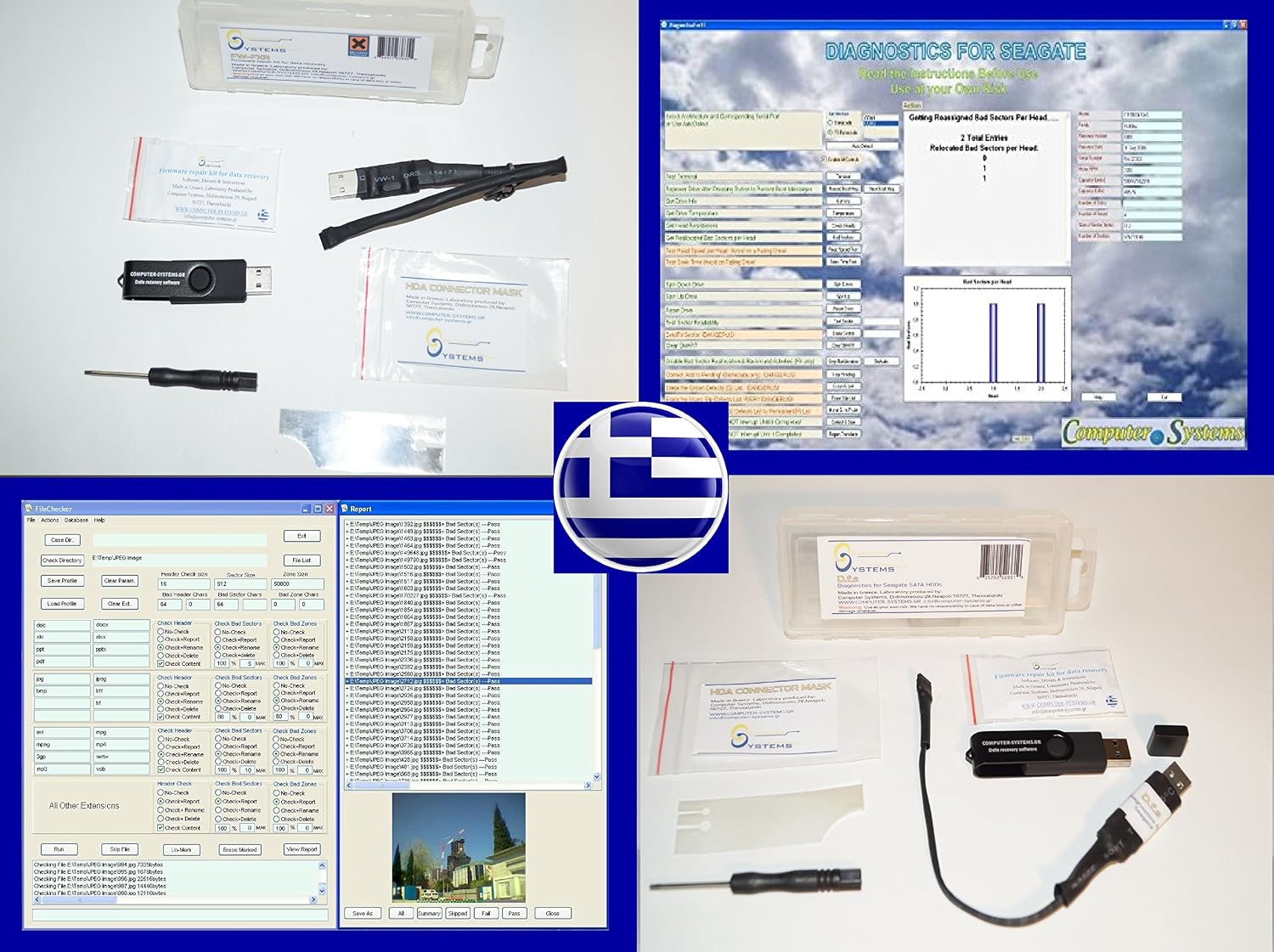
Data Recovery tool & software set by CS Labs FW-FXR DfS FileChecker Seagate SATA
Item #:
202518260
0 ratings
Write a review
Out of stock
 Imported from Japan store
Secured transaction
Ubuy works hard to protect your security and privacy. Our advanced payment security system ensures confidentiality by encrypting your information during transmission using AES (Advanced Encryption Standards) and SSL (Secure Socket Layer) protocols. Your payment details are 100% secure as we do not share your payment details with third party sellers.
Our Top Logistics Partners


FW-FXR and DfS are the only complete kits on the market providing not only the USB adapter but also all needed accessories... practically half of Seagate data recovery cases can be recovered directly with proper use of the toolkits.

Fast
Shipping

Free
Return*

Secure Packaging

100% Original Products

PCI DSS Compliance

ISO 27001 Certified


Note: Step Down Voltage Transformer required for using electronics products of JAPAN store (100 V). Recommended power converters Buy Now.


What Stands Out
Comprehensive Recovery Suite
Includes a diverse set of recovery tools tailored to efficiently retrieve lost files from various Seagate SATA drives, ensuring maximum data restoration capabilities.
User-friendly interface
Designed with an intuitive interface that simplifies the recovery process, making it accessible for both tech-savvy users and novices alike.
Advanced File Checker
Incorporates advanced algorithms for thorough file verification, enhancing data integrity and ensuring that recovered files are both complete and usable.
Product Details
| Digital Storage Capacity | 3 TB |
| Hard Disk Interface | Unknown |
| Connectivity Technology | Sata, Usb |
| Brand | CS-Labs |
| Special Feature | u30ddu30fcu30bfu30d6u30eb |
| Compatible Devices | Desktop |
| Installation Type | u5185u8535u30cfu30fcu30c9u30c9u30e9u30a4u30d6 |
| Hard Disk Size | 1 TB |
| Cache Size | 3 |
| Model Name | Seagate barracuda |
Who Should Buy?

-
Small Businesses
Ideal for small businesses needing reliable data recovery solutions for managing critical data loss situations efficiently.
-
Tech-Savvy Users
Seasoned users who understand data recovery processes will benefit from its advanced features and customization options.
-
IT Professionals
IT specialists will find the tool effective for troubleshooting and recovering data from various storage devices seamlessly.

-
Casual Users
Casual users might struggle with complex features and processes that require more technical knowledge and familiarity.
-
Mac Users
Primarily designed for Seagate SATA, it may not be compatible with non-Windows or non-Seagate systems adequately.
-
Non-technical Staff
Employees lacking technical training may find the software challenging to navigate and require additional support.
Product Description
Data Recovery tool & software set by CS Labs FW-FXR DfS FileChecker Seagate SATA
Have any Query? Chat with us
Customer Questions & Answers
-
Question:
What is the Data Recovery tool FW-FXR DfS FileChecker?
Answer: The FW-FXR DfS FileChecker is a data recovery tool designed to work with Seagate HDDs. It helps users recover lost, deleted, or corrupted files from their hard drives, ensuring data integrity and accessibility.Category: overviewConfidence: High -
Question:
What are the system requirements for using FW-FXR DfS FileChecker?
Answer: To use the FW-FXR DfS FileChecker, you need a compatible Seagate HDD and a computer running Windows or macOS, with sufficient storage space for data recovery processes. Ensure that your system meets the minimum RAM and processor specifications for optimal performance.Category: SetupConfidence: MEDIUM -
Question:
What features are included in the FW-FXR DfS FileChecker?
Answer: The FW-FXR DfS FileChecker offers features such as file recovery from various file systems, support for different file formats, and an intuitive user interface to assist users in recovering data easily. It can help recover full partitions as well as individual files.Category: UsageConfidence: MEDIUM -
Question:
What types of Seagate HDDs are compatible with FW-FXR DfS FileChecker?
Answer: FW-FXR DfS FileChecker is specifically designed to work with various Seagate HDD models. However, it's advisable to check the official documentation or customer support for a complete list of compatible models.Category: CompatibilityConfidence: MEDIUM -
Question:
What is included in the FW-FXR DfS FileChecker package?
Answer: The FW-FXR DfS FileChecker package typically includes the software application, a user manual, and license information. Additional support options might be provided through official channels.Category: AccessoriesConfidence: MEDIUM -
Question:
How should I maintain the performance of FW-FXR DfS FileChecker?
Answer: To maintain the performance of FW-FXR DfS FileChecker, ensure that your software is updated to the latest version, run regular scans to identify potential issues, and store your recovered files on a different drive to prevent overwriting.Category: MaintenanceConfidence: MEDIUM -
Question:
How do I clean up the software cache of FW-FXR DfS FileChecker?
Answer: To clean the software cache of FW-FXR DfS FileChecker, navigate to the settings or preferences section within the application and look for options to clear cache or temporary files. Restarting the software may help optimize performance.Category: CleaningsConfidence: Low -
Question:
What are common troubleshooting steps for FW-FXR DfS FileChecker?
Answer: If you encounter issues with FW-FXR DfS FileChecker, common troubleshooting steps include checking disk connections, ensuring the software is updated, and verifying compatibility with your HDD. If problems persist, consult user support for personalized assistance.Category: troubleshootingConfidence: MEDIUM -
Question:
What safety measures should I consider when using FW-FXR DfS FileChecker?
Answer: When using FW-FXR DfS FileChecker, ensure that your computer and drives are properly grounded to prevent electrical hazards. Avoid using the software while the system is under heavy load to protect data integrity during recovery processes.Category: SafetyConfidence: MEDIUM -
Question:
What is the warranty policy for FW-FXR DfS FileChecker?
Answer: The warranty policy for FW-FXR DfS FileChecker typically covers defects in software functionality under normal usage conditions. For detailed warranty information, refer to the specific terms provided at the point of purchase or on the official website.Category: WarrantyConfidence: MEDIUM -
Question:
Can I return the FW-FXR DfS FileChecker if I'm not satisfied?
Answer: Yes, FW-FXR DfS FileChecker usually comes with a return policy, allowing customers to return the software if they are not satisfied. It is essential to check the specific return guidelines provided by the seller for accurate details.Category: returnsConfidence: MEDIUM -
Question:
Is the FW-FXR DfS FileChecker available for download?
Answer: FW-FXR DfS FileChecker is typically available for download directly from the official website or authorized retailers. Ensure you are downloading from a trusted source to avoid malware risks.Category: AvailabilityConfidence: High -
Question:
Are there any software updates for FW-FXR DfS FileChecker?
Answer: Yes, the developers may release software updates for FW-FXR DfS FileChecker to enhance functionality and patch security vulnerabilities. It is recommended to enable automatic updates or check the official site regularly.Category: softwareConfidence: MEDIUM -
Question:
What are the differences between various models of FW-FXR DfS FileChecker?
Answer: There may be several versions of FW-FXR DfS FileChecker, each offering different features or compatibility options. For detailed differences, it's best to consult the official documentation or comparison charts available on the brand's website.Category: OtherConfidence: MEDIUM -
Question:
What types of data can be recovered using FW-FXR DfS FileChecker?
Answer: FW-FXR DfS FileChecker can recover a variety of data types, including documents, photos, videos, and other file formats that may have been lost, deleted, or corrupted. Specific capabilities may vary based on the file system in use.Category: UsageConfidence: MEDIUM
CS Labs Editorial Review
No editorial reviews found
Customer Reviews & Ratings
1 customers ratings
-
5 Star
100%
-
4 Star
0%
-
3 Star
0%
-
2 Star
0%
-
1 Star
0%
Review this product
Share your thoughts with other customers
Platform Trust & Buyer Confidence

MT
Mohd
Verified buyer
“The product received very good packaging & safe…Thank You”
16 June 2026 · via Trustpilot
SJ
Shawati
Verified buyer
“Accurate delivery timing given”
16 June 2026 · via Trustpilot
YB
Youcef
Verified buyer
“Not madly expensive like I thought, and much quicker than promised.”
15 June 2026 · via Trustpilot
LM
Leila
Verified buyer
“Never dealt with Ubuy before, but everything worked out great. Seamless cross border purchasing and shipping. Thanks!”
6/7/2026 · via Trustpilot
KA
Kwame
Verified buyer
“The process was smooth, with clear communication and timelines. This was my 1st purchase and I am really impressed. I will definitely be coming back.”
12 June 2026 · via Trustpilot
Secure Checkout
Global Delivery
Easy Returns
Genuine Products
Product Price History
Important information
- Limitations : For products shipped internationally, please note that any manufacturer warranty may not be valid; manufacturer service options may not be available; product manuals, instructions, and safety warnings may not be in destination country languages; the products (and accompanying materials) may not be designed in accordance with destination country standards, specifications, and labeling requirements; and the products may not conform to destination country voltage and other electrical standards (requiring use of an adapter or converter if appropriate). The recipient is responsible for assuring that the product can be lawfully imported to the destination country. When ordering from Ubuy or its affiliates, the recipient is the importer of record and must comply with all laws and regulations of the destination country.
- Not all the products listed on Ubuy are for sale, as Ubuy is a global search engine. Products are subject to export/trade regulations.
Currently unavailable.
We don't know when or if this item will be back in stock.
This item is not restrict in my country.(Please click on above link if this item is not restrict in your country, So our team will review and allow.)
Secured transaction
PCI DSS compliant and ISO 27001:2022 certified, with encrypted payments and full buyer protection on every order.
Our Top Logistics Partners
Fastest cross-border delivery
Features & Benefits
- Two data recovery tool kits offered
- Solve firmware issues of all SATA Seagate HDDs (up to 3TB drives)
- Includes FileChecker by CS labs post data recovery software full licence
- Can unlock the firmware and get the drive back to working condition
- DfS compatible drives include various models
- Half of Seagate data recovery cases can be recovered directly with proper use of the toolkits
Ubuy Assurance
Experience worry-free shopping with 100% original products, PCI DSS-compliant payment security, ISO 27001-certified data protection, the fastest cross-border delivery, free returns *, and secure packaging on every order.