0 ratings

Item #:
103745871
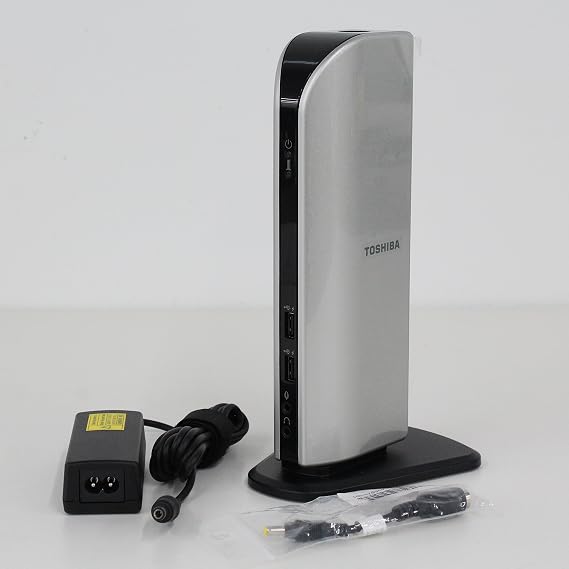
Toshiba Dynadock U Universal USB Connect Docking Station
Item #:
103745871
PKR 33879
Price Details
Excluding Shipping & Custom charges ( Shipping and custom charges will be calculated on checkout )
*All items will import from US
0 ratings
Write a review
In stock
 Imported from USA store
QTY:
Order now and get it around Monday, August 03
Secured transaction
Ubuy works hard to protect your security and privacy. Our advanced payment security system ensures confidentiality by encrypting your information during transmission using AES (Advanced Encryption Standards) and SSL (Secure Socket Layer) protocols. Your payment details are 100% secure as we do not share your payment details with third party sellers.
Our Top Logistics Partners


One cable connection from your PC to all your devices.

Fast
Shipping

Free
Return*

Secure Packaging

100% Original Products

PCI DSS Compliance

ISO 27001 Certified


Note: Step Down Voltage Transformer required for using electronics products of US store (110-120). Recommended power converters Buy Now.


What Stands Out
Universal Compatibility
The Toshiba Dynadock U seamlessly connects with various devices across different platforms, ensuring versatile use and compatibility for users with diverse laptops and operating systems.
Enhanced Connectivity
Equipped with multiple USB ports, HDMI, and Ethernet connections, this docking station enhances your workspace by providing extensive connectivity options to all your essential devices.
Compact Design
Its space-saving design allows for easy transport and fits snugly into any workspace, making it an ideal choice for professionals who need mobility without sacrificing functionality.
Product Details
| Product Dimensions (L x W x H) | 3.1 x 1.8 x 8.75 inches (7.9 x 4.6 x 22.2 cm) |
| Item Weight | 1.2 pounds (540 grams) |
| Item model number | PA3575U-1PRP |
| Is Discontinued By Manufacturer | No |
| Date First Available | November 11, 2006 |
| Manufacturer | Toshiba |
| Language | English |
Who Should Buy?

-
Remote Workers
Ideal for remote workers needing multiple connections for peripherals, ensuring an efficient home office setup.
-
Gamers
Perfect for gamers who want to connect multiple devices while maintaining high-resolution displays and audio.
-
Frequent Travelers
Convenient for travelers needing a compact yet powerful docking station to connect laptops to various external devices.

-
High-Performance Users
Not suitable for users requiring high-performance graphics or extensive processing power, as it's limited by USB connections.
Product Description
Toshiba Dynadock U Universal USB Connect Docking Station
Have any Query? Chat with us
Customer Questions & Answers
-
Question:
What is the Toshiba Dynadock U docking station?
Answer: The Toshiba Dynadock U is a universal USB docking station designed to expand connectivity options for laptops and tablets. It allows users to connect multiple peripherals such as monitors, keyboards, and mice through a single USB connection.Category: overviewConfidence: high -
Question:
What are the specifications of the Toshiba Dynadock U?
Answer: The Dynadock U supports dual display setups with a maximum resolution of 2048 x 1152 pixels on compatible monitors. It includes USB 3.0 ports, HDMI, VGA, and Ethernet connectivity, catering to a wide array of devices.Category: specsConfidence: high -
Question:
How do I set up the Toshiba Dynadock U?
Answer: To set up the Dynadock U, connect it to a power source using the supplied adapter, then connect the docking station to your laptop via USB. Finally, install any required drivers from the Toshiba website or included installation media.Category: setupConfidence: high -
Question:
What are the power requirements for the Toshiba Dynadock U?
Answer: The Dynadock U requires an external power supply, which is included. It operates on standard electrical specifications typical for USB devices.Category: powerConfidence: medium -
Question:
What accessories come with the Toshiba Dynadock U?
Answer: In the box, you will find the Dynadock U docking station, a power adapter, an installation CD with drivers, and a quick start guide to help with setup.Category: accessoriesConfidence: high -
Question:
What operating systems are compatible with the Toshiba Dynadock U?
Answer: The Dynadock U is compatible with Windows and macOS. However, ensure to check for the latest driver updates on the Toshiba website for optimal performance.Category: compatibilityConfidence: high -
Question:
How do I clean the Toshiba Dynadock U?
Answer: To clean the Dynadock U, use a soft, dry cloth to wipe the surface. Avoid using harsh chemicals or abrasive materials that could damage the device.Category: cleaningConfidence: high -
Question:
What should I do if the Toshiba Dynadock U is not recognized by my computer?
Answer: If your Dynadock U is not recognized, try reconnecting the USB cable, updating drivers, and ensuring the device is powered. If issues persist, consult the troubleshooting section of the user manual.Category: troubleshootingConfidence: high -
Question:
What is the warranty for the Toshiba Dynadock U?
Answer: Typically, the Toshiba Dynadock U comes with a limited warranty that covers manufacturing defects. Please check the warranty card included in the box or the Toshiba website for specific terms.Category: warrantyConfidence: medium -
Question:
Can I use different monitors with the Toshiba Dynadock U?
Answer: Yes, the Dynadock U supports multiple monitor configurations, including HDMI and VGA connections, allowing you to connect various monitor types as long as they meet the resolution specifications.Category: usageConfidence: high -
Question:
Are there different models of the Toshiba Dynadock U?
Answer: The Toshiba Dynadock U has a few variants, like the Dynadock U3.0, which may differ in connectivity options and supported resolutions. Refer to Toshiba's official site for detailed comparisons.Category: otherConfidence: medium -
Question:
How often do I need to update the drivers for the Toshiba Dynadock U?
Answer: It is recommended to check for driver updates periodically, especially after major operating system updates, to ensure compatibility and optimal performance.Category: softwareConfidence: medium -
Question:
What safety precautions should I take with the Toshiba Dynadock U?
Answer: As with all electronic devices, avoid exposing the Dynadock U to moisture, extreme temperatures, or physical damage. Ensure that it is properly ventilated during use.Category: safetyConfidence: high -
Question:
Where can I purchase the Toshiba Dynadock U?
Answer: The Toshiba Dynadock U is available for purchase through various online retailers and electronics stores. Availability may vary by region, so check local listings.Category: availabilityConfidence: medium
TOSHIBA Docking Stations PA3575U-1PRP Editorial Review
No editorial reviews found
Customer Reviews & Ratings
1 customers ratings
-
5 Star
100%
-
4 Star
0%
-
3 Star
0%
-
2 Star
0%
-
1 Star
0%
Review this product
Share your thoughts with other customers
Platform Trust & Buyer Confidence

MA
Mohammad
Verified buyer
“Excellent quality and original too,when ubuy send original things I will appreciate that ,I very satisfied thank you”
23 July 2026 · via Trustpilot
CK
Chitra
Verified buyer
“The order and delivery progress was communicated very well. Package arrived within the estimated time. Products arrived as expected in good condition.”
22-Jul-26 · via Trustpilot
K
kund
Verified buyer
“Good supply of products. Safe payment methods, and shipment worldwide! Genuine products.”
23-Jul-26 · via Trustpilot
OO
Onesi
Verified buyer
“Was my first time buying a product from Ubuy, but I found it so helpful. This is reliable. Gonna place a new order!”
22 July 2026 · via Trustpilot
SJ
SAO JOHN
Verified buyer
“Ubuy is a great online platform to buy stuff. Reliable, fast delivery time and great value for money. I've been using Ubuy online shopping platform for three years now and will continue to do so.”
23 July 2026 · via Trustpilot
Secure Checkout
Global Delivery
Easy Returns
Genuine Products
Product Price History
Important information
- Limitations : For products shipped internationally, please note that any manufacturer warranty may not be valid; manufacturer service options may not be available; product manuals, instructions, and safety warnings may not be in destination country languages; the products (and accompanying materials) may not be designed in accordance with destination country standards, specifications, and labeling requirements; and the products may not conform to destination country voltage and other electrical standards (requiring use of an adapter or converter if appropriate). The recipient is responsible for assuring that the product can be lawfully imported to the destination country. When ordering from Ubuy or its affiliates, the recipient is the importer of record and must comply with all laws and regulations of the destination country.
- Not all the products listed on Ubuy are for sale, as Ubuy is a global search engine. Products are subject to export/trade regulations.
PKR 33879
Order now and get it around Monday, August 03
This item is not restrict in my country.(Please click on above link if this item is not restrict in your country, So our team will review and allow.)
QTY:
Secured transaction
PCI DSS compliant and ISO 27001:2022 certified, with encrypted payments and full buyer protection on every order.
Our Top Logistics Partners
Fastest cross-border delivery
Features & Benefits
- Connect multiple devices with a single USB cable.
- Compatible with all Windows-based PCs, including Vista.
- Supports HD resolutions up to 1920x1200 for high-quality displays.
- Space-saving design reduces desktop clutter.
- Hot swappable for easy device management.
- Easily undock with the convenient undock button.
Ubuy Assurance
Experience worry-free shopping with 100% original products, PCI DSS-compliant payment security, ISO 27001-certified data protection, the fastest cross-border delivery, free returns *, and secure packaging on every order.